Tweaks
ACCENT COLOR
NAV STYLE
Compact nav
ANIMATIONS
Scroll fade-ins
HOW IT WORKS

From controller
to clean docs.
In 3 simple steps.

No agents. No cloud. No subscription.
Export clean VLAN docs in seconds.

FREE VERSION 10 switches
unlimited VLANs
HTML + PDF
fully offline
PROCESS OVERVIEW
01
Create the Configuration
Controller address, credentials & output folder
02
Start the Export
UniDoc reads all switches & VLAN assignments
03
Enjoy the Documentation
HTML & PDF reports ready in your output folder
Scroll to explore
01
Run UniDoc_Configure
to set up access

Before your first run, open UniDoc_Configure.exe and enter your UniFi Controller address, admin credentials, and the folder where reports should be saved. UniDoc then generates a single encrypted file, config.enc, stored alongside UniDoc.exe.

No installation, no registry changes, just ready to go.

config.enc is encrypted. Your credentials are never stored in plain text.
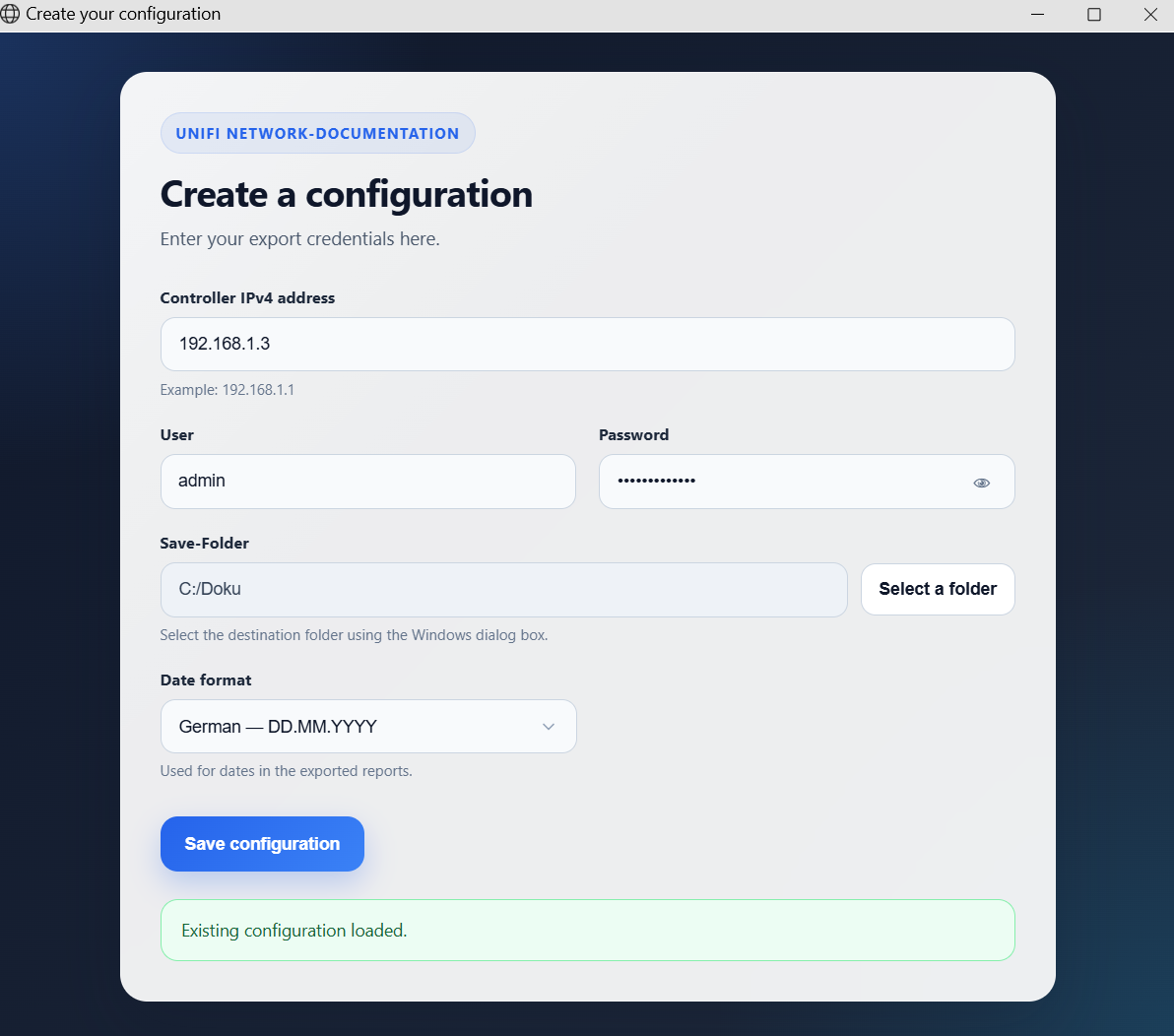
UniDoc_Configure.exe
$ UniDoc.exe
Connecting to UniFi at 192.168.1.1…
Login successful
Switches found: 6
VLANs configured: 12
Reading switch ports…
SW-Core-PoE48-01 - 48 ports
SW-Sales-01 - 24 ports
SW-Reception-01 - 16 ports
SW-Controlling-01 - 24 ports
Building VLAN tables…
Done - 3.2s
02
UniDoc reads all ports and VLAN assignments

Run UniDoc.exe with a single click. It loads your config.enc, connects to your UniFi Controller, and discovers all switches in your network.

UniDoc then scans every port on each switch and captures VLAN IDs and VLAN names. No agents or plugins are required, as it uses the same API as the UniFi web interface.

All processing happens locally on your machine, and the controller is only contacted during this step.

No data is sent to any external server. All processing happens on your machine.
03
Get your VLAN reports as HTML and PDF

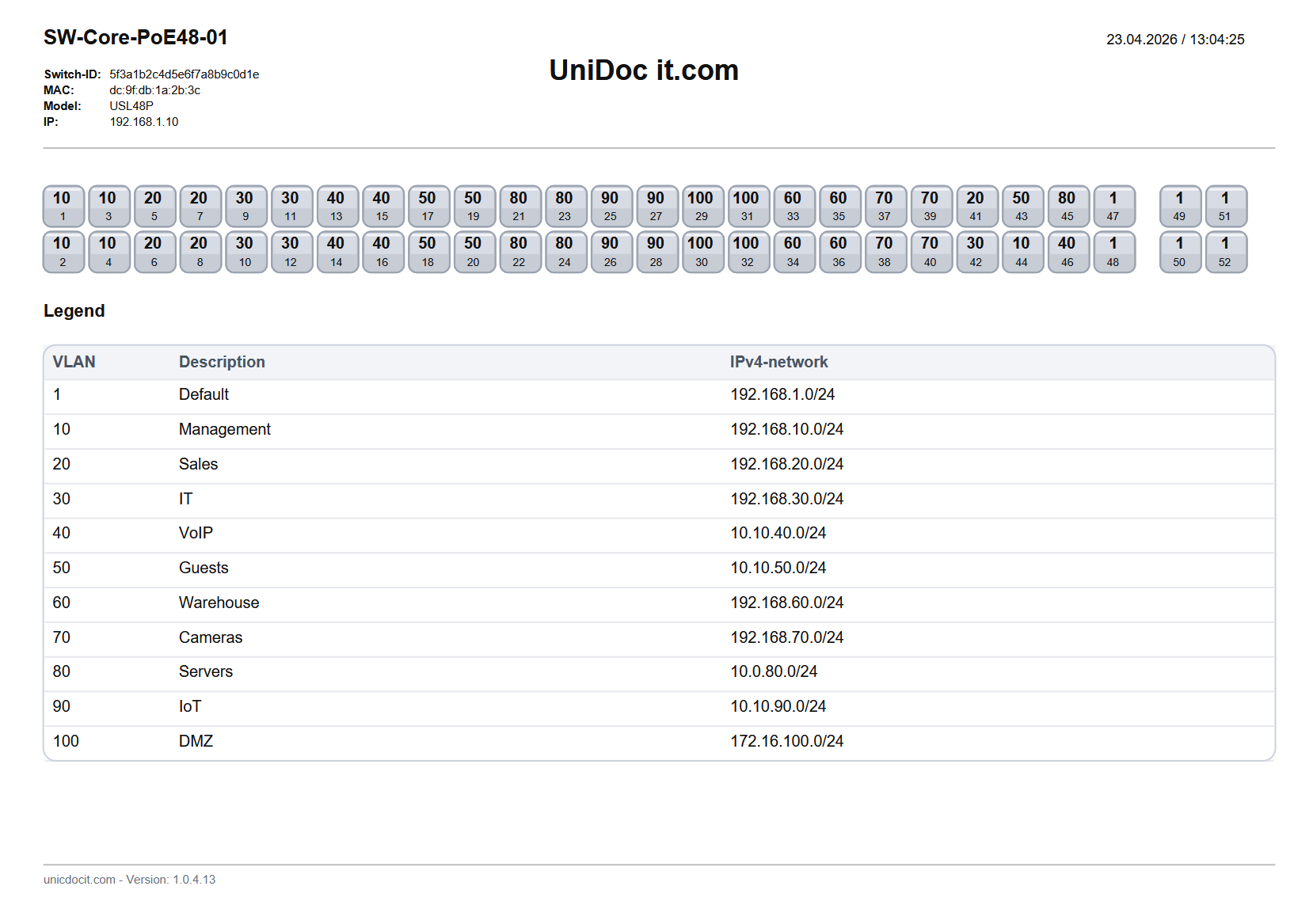
UniDoc saves the results to your chosen output folder, creating a separate report for each switch with all ports, VLAN IDs, and VLAN names clearly listed.

You get two formats: a clean HTML file for quick access in your browser and a print-ready PDF file for documentation or archiving. Pick whatever works best for you.

Each report includes a blank patch panel column. Print it, place it in your rack or cabinet, and fill in the physical connections by hand, such as A-03. This gives you a complete on-site reference without any extra tools.

HTML and PDF contain the same data - port, VLAN ID, and VLAN name per switch.
Patch panel column is intentionally blank - fill it in by hand directly on the printed sheet.
VLAN report output
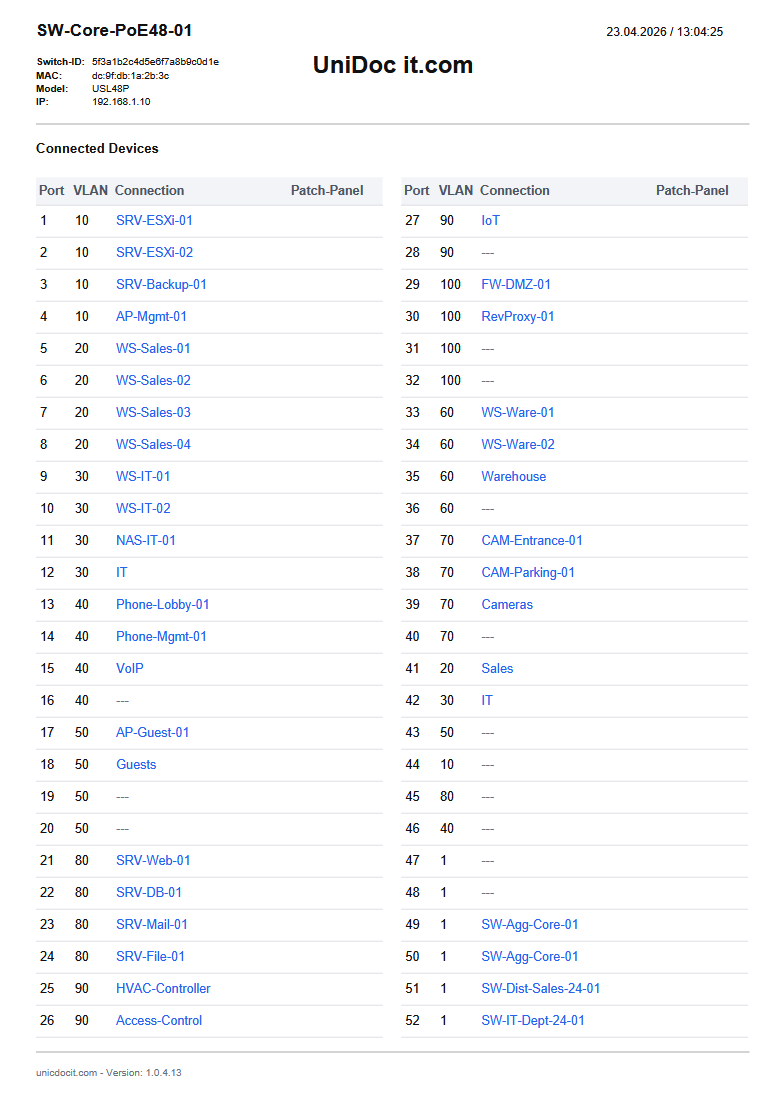
Device list
A full device inventory - automatically

In addition to per-switch reports, UniDoc creates a device list with a full inventory of every switch found on your controller. Each entry shows the switch name, model, management IP, port count, port layout, and connected devices.

Use it to quickly verify your documentation run or keep it as a companion document alongside your VLAN reports.

No extra export steps and no manual cleanup.

Device list, HTML reports, and PDF reports are all created in a single run.
REQUIREMENTS
[ W ]
Windows 10 / 11
UniDoc and UniDoc_Configure are standalone Windows executables. No installation, no .NET dependencies.
PLATFORM
[ U ]
UniFi Controller
A running UniFi Controller (self-hosted or UniFi OS) reachable from the machine running UniDoc. Cloud Key and UDM are supported.
NETWORK
[ N ]
Local network access
UniDoc only needs to reach your controller during the read step. After that, all processing and export happens offline - no internet required.
OFFLINE
Ready to document
your network?

Download the Free Version and run it against your UniFi network today. No account, no installation, no cloud.
Just create the config.enc with our Unidoc_Configure.exe and start the documentation with a single run of the Unidoc.exe

RUNS ON WINDOWS · NO INTERNET REQUIRED